Complete layouts.
Your exact standards.
Every time.
Designer-friendly. Manager-approved.
The Civil 3D plugin that builds your full sheet set and keeps it synchronized when the design, the layouts, or your standards change. New drawings or existing. Always on standard.
Supports Autodesk Civil 3D 2025, 2026, and 2027.
SheetAgent for Civil 3D never modifies your manual work. It flags drift in a health panel and lets you decide what to accept or revert. Your drawings stay yours.
A complete sheet set, on your standard.
Everything stays dynamic: change anything as your design evolves, never rebuild.
LIVE FROM TELEMETRY, SINCE APRIL 2026
1,202
billable hours recovered
2,694
layouts created
1,641
layouts updated
10,762
layouts audited
Configure. Preview. Build.
Configure each layout in the panel. Preview the result. Build when it's right.
A plan + profile sheet, built in under two minutes. (Video shortened for the page.)
Same workflow for every layout type: Single viewport · Multi VP (plan+profile, plan+plan, plan+duplicate) · PDF detail import · Project keyplans
For CAD managers.
The three questions every standards-conscious team asks before adopting a plugin.
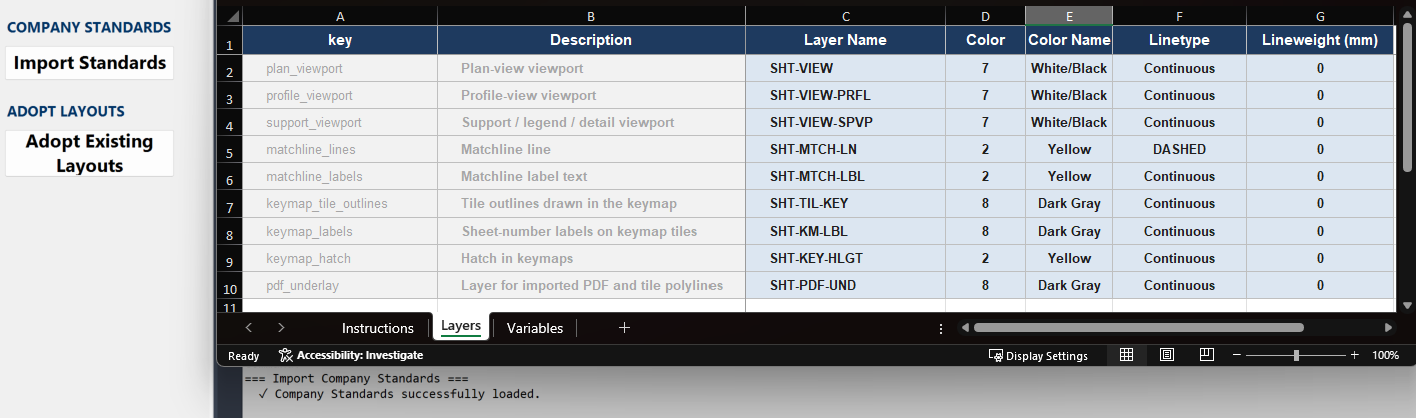
Set the standard. Keep it current.
A CAD manager edits one Excel template: layers, colors, line types, viewport defaults. Every layout every user creates is on standard. Change the template later, and the health palette flags every layout that's drifted; one click restandardizes them all.
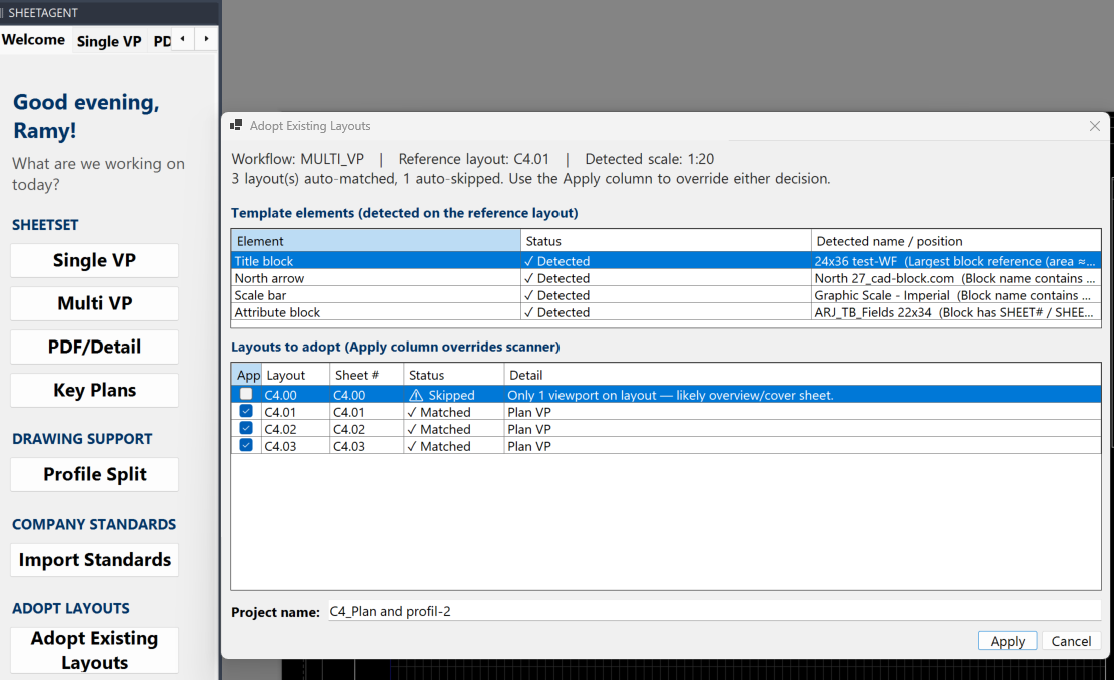
Works on legacy drawings.
Layouts built before SheetAgent for Civil 3D was installed become SheetAgent-ready in a few clicks. Once adopted, they're managed like any other: health palette, layer standards, all tools apply fully.
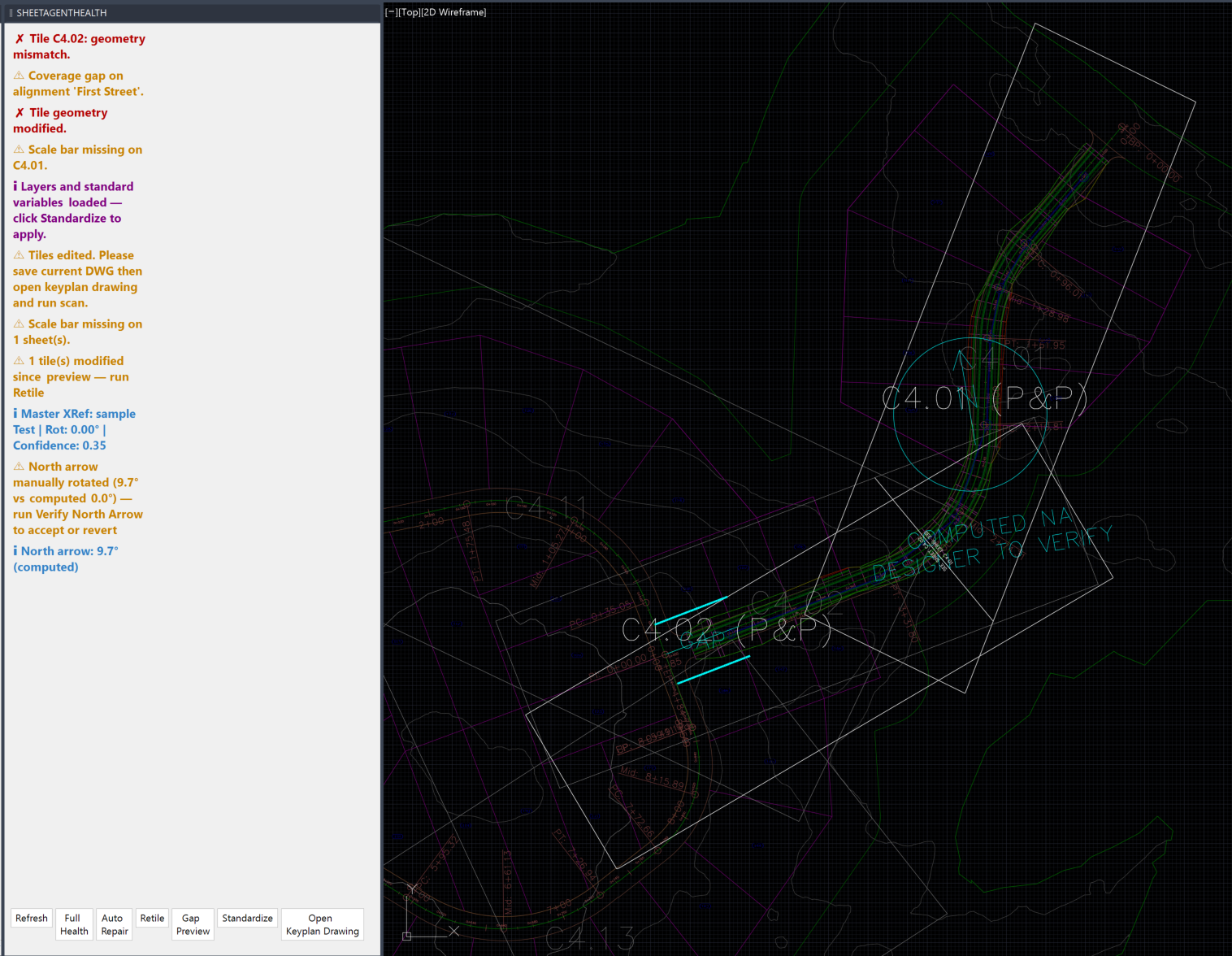
Warns. Never blocks.
The health palette flags drift, missing elements, and edits, but never forces a change. Fix it, leave it, or come back to it later. Designer always in control.
Four ways to generate a single-viewport sheet.
Pick the mode that fits the project. The tile stays editable either way.
Take everything above and control the whole project from one drawing.
One control drawing holds the tiling. Every discipline inherits it, every file stays in sync, and the numbering runs straight through the whole project.
One control drawing, every discipline, every file. Built once, then kept in sync as the project changes.
What SheetAgent for Civil 3D recovers on a project.
Conservative time recovered, valued at a $100 billable hour rate.
Small project
12 sheets
Medium-large
30 sheets
Large project
100 sheets
✦These numbers only count layout build and update time. They exclude time recovered on layer management, support viewports, key maps, legends, PDF imports, and exhibit workflows. The real figure is significantly higher.
You see what we see.
The same Reports page every customer gets: every number computed per command, from their own seats' telemetry.
A glimpse of the manager portal: every command in the catalog has a published minutes-per-run estimate, multiplied by what your seats actually ran. No averages, no vendor approximations, just your team's telemetry. The full experience is in the actual portal.
It's also where your company controls access: every seat is assigned by your own manager, and nobody can run SheetAgent for Civil 3D, inside or outside your firm, without their say-so.
One firm. Eight weeks. 186 hours back.
A civil engineering firm ran SheetAgent for Civil 3D on live project work: five seats, real deadlines, real clients. The firm converted after the trial, from five seats to fifteen.
186 hrs
estimated billable time recovered, about $18,600 at a $100/hr rate
498
layouts built
273
layouts updated
1,941
layout audits
1,952
command runs · 71 sessions
“We produced 105 sheets in 4 days, counting several iterations and edits while learning how to use the tool.”Project engineer at the firm, during the trial
✦Estimated hours = command runs × published minutes-per-run, summed across value-bearing commands over an eight-week period. Excludes layer management, support viewports, key maps, and exhibit workflows. The real figure is higher. The separately quoted figure of about 95 billable hours recovered per seat per year is the conservative cross-customer floor; these case-study numbers reflect one firm’s measured eight-week period.
Pricing
Annual seats. One rate per seat, no tiers to negotiate. Every seat includes the full feature set; no capabilities held back by plan.
Seats 1 to 50
$749
per seat / yr
What an engineer’s hour bills at.
Customer telemetry averages about 8. Use your own estimate.
Flat $749 per seat per year to 50 seats.
Annual cost
$5,992
Value recovered / yr
$76,800
Net / yr
$70,808
Pays for itself in
under a month
*Time recovered is drafting time you get back, not a discount on the subscription. The hours field is yours to set; the default reflects customer telemetry, conservatively discounted, at about 95 billable hours recovered per seat per year.
Three ways to start.
Install it yourself in minutes, run it across a team, or let us walk you through it.
FOR TEAMS
30-day team trial
Seats for everyone who drafts, running on your own projects and your own standards, with the Manager Portal showing what the tool gives back. No commitment.
Full access to every feature
No credit card, no contract
Clean business-domain requests can be provisioned immediately
FOR THE CURIOUS
30-day trial, no sign-up
Download the installer and type your email in the palette; the thirty days begin there. Nothing to fill in, and no company to set up first.
Same 30 days, same full feature set
No form, no credit card, no waiting on approval
Move to a team trial later without losing your work
Windows. Requires Civil 3D 2025, 2026 or 2027.